

Latency in AI Applications: How to Balance Speed, Accuracy, and Cost

You spent six months building it. The model is accurate. Even the UI is clean. The demo crushed it in the boardroom.
Then it went live, and users started dropping off after the first query.
Because it took 4.3 seconds to arrive. That’s AI latency, and it’s quietly killing products that otherwise work perfectly.
This is the moment most ai powered mobile app development company realize they’ve been solving the wrong problem. They obsessed over benchmark scores and hallucination rates, but shipped a product that feels broken. In the human brain, a 4-second wait from a conversational AI doesn’t read as “the model is thinking.” It reads as “this thing doesn’t work.”
And users don’t file bug reports. They just leave.
The teams that get this right don’t treat latency as a final-mile optimization. They treat it as a design constraint from day one, on par with accuracy and cost. This blog is for the CTOs and engineers who want to build AI applications that are fast and right and affordable, and understand that achieving all three requires deliberate trade-offs, not wishful thinking.
What Is Latency? And Why It Matters Differently in AI?
Latency meaning in its simplest form, is the time elapsed between a request being made and a response being received. In traditional web systems, that latency is measured in milliseconds and driven mostly by network hops and database queries.
In AI systems, the definition expands significantly. AI latency encompasses multiple compounding delays:
- Time to First Token (TTFT): How long before your streaming model outputs even a single word?
- Compute latency: The time the model spends actually running inference is heavily influenced by model size and hardware.
- Network latency: Data traveling between the client, server, and model endpoint.
- Queue latency: Wait time under concurrent load when inference servers are saturated.
- Post-processing latency: Parsing, formatting, guardrail checks, and tool-call execution after the model responds.
Understanding what is latency vs bandwidth is also critical here. Bandwidth is how much data can flow through a pipe at once, or throughput. Latency is how long it takes for a single unit of data to make the round trip. A high-bandwidth, high-latency connection can still feel unusably slow for interactive AI applications because each generation step is gated by that round-trip delay.
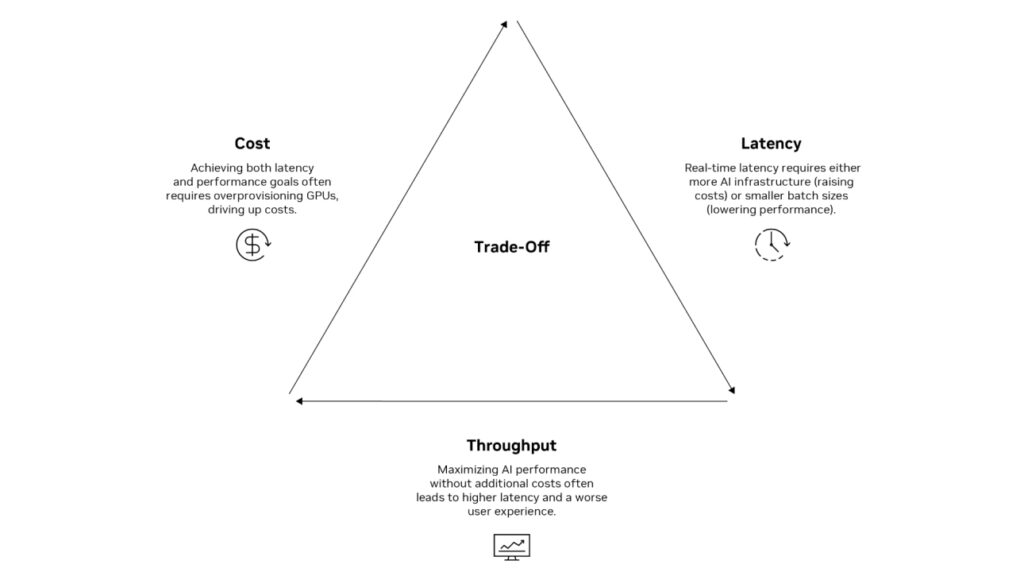
Image Source: NVIDIA
What Causes Latency in AI Applications?
Before you can fix it, you need to know what causes latency in your specific stack. In AI applications, the culprits typically fall into four categories:
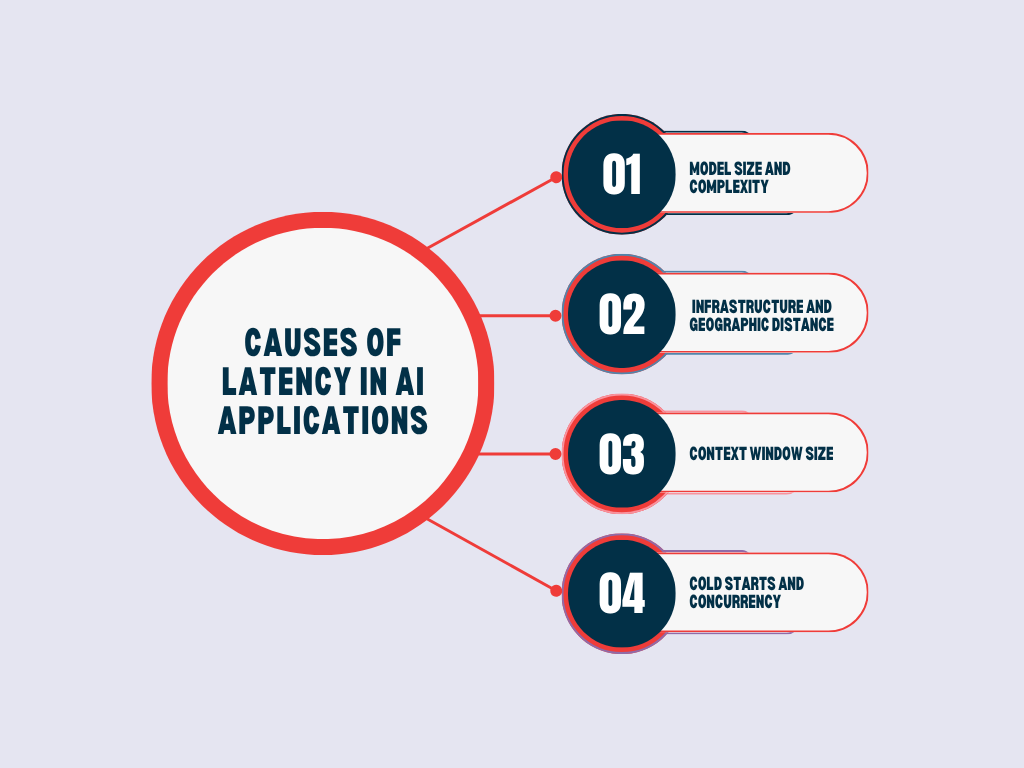
1. Model Size and Complexity
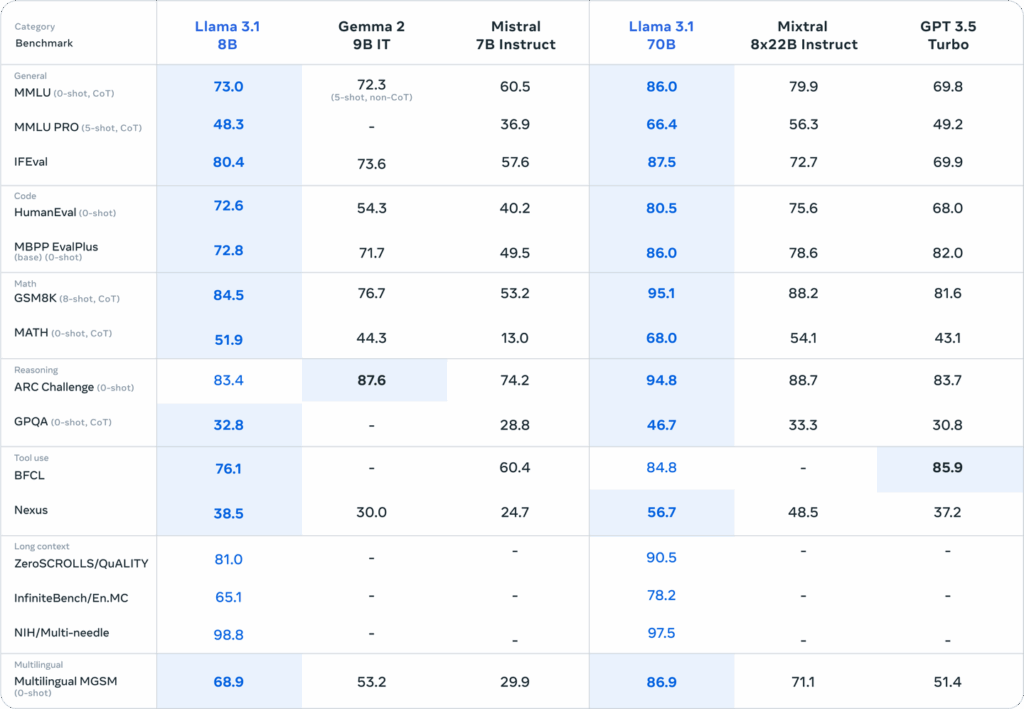
Larger models, more parameters, and deeper attention layers require more computation per token. A 70B parameter model will consistently produce higher compute latency than a 7B model. This is physics, not a configuration problem.
2. Infrastructure and Geographic Distance
If your model is hosted in us-east-1 and your users are in Southeast Asia or Europe, every inference call carries that geographic penalty. Cloud-hosted AI inference offers flexibility but introduces network latency that on-premise or edge deployments avoid.
3. Context Window Size
Transformer attention scales quadratically with sequence length. A prompt with 2,048 tokens will incur significantly higher latency than one with 512 tokens, even with identical hardware.
4. Cold Starts and Concurrency
Serverless AI deployments suffer from cold start penalties. Under heavy concurrent load, the request queue and what does high latency mean in that moment is simply: your model can’t keep up with demand.
▶️You might like reading our blog on: Evaluating If Your Product Is Ready for AI
The Six Types of Latency in AI Systems
Most AI developers treat AI latency as one problem. It’s actually six distinct ones, each with a different root cause and a different fix. Collapsing them together is how optimization efforts stall.
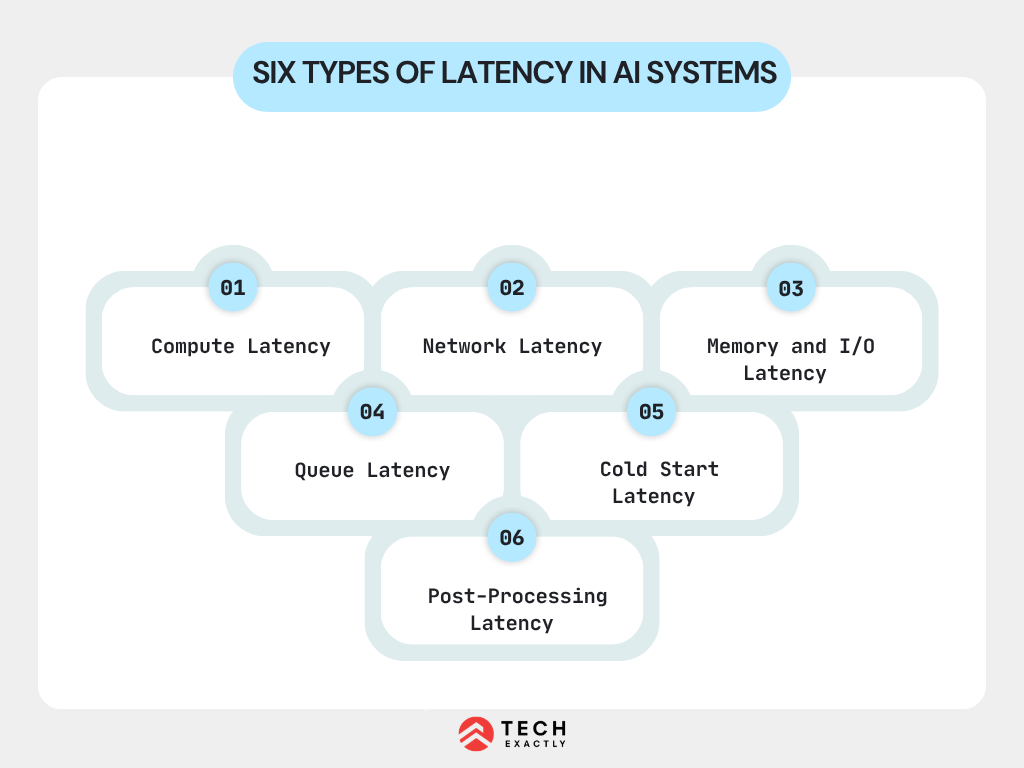
1. Compute Latency
The time the model takes to run inference on your hardware. Directly tied to model parameter count, batch size, and GPU/TPU capability. This is the latency type most teams focus on, and for good reason, it’s usually the largest contributor in LLM pipelines.
Example: A healthcare AI platform built for real-time clinical decision support was running a 70B parameter model for all queries, including simple ones like drug dosage lookups. Compute latency averaged 4.2 seconds per query. After routing those simple, structured queries to a fine-tuned 7B model and reserving the 70B model for complex diagnostic reasoning, compute latency for 60% of queries dropped to under 600ms, with no measurable accuracy difference on those query types. The fix wasn’t better hardware. It was eliminating the mismatch between model size and task complexity.
2. Network Latency
The time data spends in transit between the client, application server, and model inference endpoint. Geographic distance, number of hops, and protocol overhead all contribute. For globally distributed applications, this alone can add 200–500ms per request.
3. Memory and I/O Latency
Loading model weights from disk or transferring data between GPU memory tiers introduces a delay, especially during cold starts or when model shards are distributed across multiple GPUs. This type is often invisible in local testing but surfaces aggressively in cloud deployments.
4. Queue Latency
Under concurrent load, inference requests wait in line before the model even begins processing them. In high-traffic applications, queue latency can dwarf compute latency. This is what makes P95/P99 metrics so different from P50 in production AI systems.
5. Cold Start Latency
Serverless and auto-scaled inference deployments spin down when idle. The first request after an idle period pays the full cost of loading model weights into GPU memory, which can take 10–30 seconds for large models. For infrequently triggered AI features, this creates jarring, unpredictable delays.
6. Post-Processing Latency
Often underestimated. After the model generates tokens, your application still needs to: parse structured outputs, run safety/guardrail checks, execute tool calls or function calls, format responses, and log the interaction. In agentic AI pipelines with multiple tool calls, this phase can rival compute latency in total time cost.
Understanding which type is the primary bottleneck in your system determines the entire optimization strategy. Profiling your pipeline end-to-end is the only way to find out.
▶️You might like reading our recent blog on How to Audit Your AI System Before Production
Why This (AI latency) Isn’t a UX Problem
Tech teams often treat latency as a user experience concern. It is, but the revenue implications are just as severe.
Amazon’s internal research found that every 100 milliseconds of latency costs them 1% in sales. Google discovered that a 0.5-second delay in page generation dropped traffic by 20%. These establish the baseline tolerance users have developed.
Bring that tolerance into the AI context. For a high-volume AI chatbot app development company building revenue-critical applications, that delta is the difference between a viable product and a liability.
Patience, in the age of generative AI, is not a virtue users are extending to your platform.
A GenAI Expert’s Wake-Up Call
As shared by our Senior GenAI Developer at Tech Exactly:
“We were building a real-time AI assistant for a financial services client, think live portfolio analysis, natural language queries, the works. We’d validated the model accuracy extensively. What we hadn’t stress-tested was latency under real user concurrency.
When we went live, everything looked fine in staging. But in production, with 300 concurrent users hitting the endpoint at peak hours, response times ballooned from 800ms to nearly 6 seconds. The model was giving correct answers. Nobody was waiting to read them.
We ended up implementing a two-tier architecture: a smaller, faster model handling initial intent classification and simple queries, with the larger model reserved for complex, high-stakes analysis. We also moved to streaming responses so users saw output within 400ms of submitting a query, even if the full response took longer. Perceived latency dropped by 70%. The lesson wasn’t ‘use a smaller model.’ It was: design your latency architecture before you design your model pipeline — and that includes deciding whether to hit a hosted API or self-host a custom model.
This is the challenge every serious AI powered mobile app development company encounters when moving from demo to production. Latency is an architectural decision, not an afterthought.
Speed vs. Accuracy vs. Cost
Here’s the uncomfortable truth: in AI system design, you rarely get all three.
Trade-Off | Speed ↑ | Accuracy | Cost |
Smaller model | ✅ Faster | ⚠️ May degrade | ✅ Cheaper |
Model quantization | ✅ Faster | ⚠️ Slight loss | ✅ Cheaper |
Larger model, GPU cluster | ❌ Slower | ✅ Higher | ❌ Expensive |
Caching frequent responses | ✅ Fastest | ✅ Preserved | ✅ Cheapest |
Edge/on-premise inference | ✅ Faster | ✅ Preserved | ❌ CapEx cost |
❌ Adds latency | ✅ Higher (factual) | ⚠️ Variable |
The job of a CTO or principal engineer isn’t to maximize all three simultaneously; it’s to identify which axis your application lives on and optimize accordingly.
A real-time voice AI assistant needs low latency above all else; users tolerate minor accuracy dips before they tolerate a 2-second delay. A legal document review AI should tolerate 30 seconds of processing time in exchange for near-perfect accuracy. A cost-sensitive internal knowledge chatbot needs to minimize per-query inference spend, even if that means slight latency increases from batching.
Define your constraint hierarchy first. Then engineer for it.
How to Reduce Lag: Practical Strategies That Work in Production
How to reduce lag in AI applications is a layered approach. Here’s what engineering teams are implementing:
1. Stream Responses (Reduce Perceived Latency)
Don’t wait for the full model response before sending output. Streaming via Server-Sent Events (SSE) or WebSockets lets users begin reading within 200–400ms, even for long responses. This doesn’t reduce actual inference time; it radically improves perceived speed, which is what users experience.
2. Use the Right Model for the Right Task
Implement model routing. Deploy a smaller, faster model (7B–13B parameters) for intent classification, simple FAQ responses, and low-stakes queries. Reserve larger, more capable models for complex reasoning tasks. The cost and latency savings compound at scale.
3. Quantization and Distillation
Model quantization (reducing precision from FP32 to INT8 or FP16) can cut inference compute by 2–4x with minimal accuracy loss for most production use cases. Knowledge distillation, like training smaller models to mimic larger ones, is another route for teams willing to invest in model pipeline work.
4. Semantic Caching
Implement a semantic similarity layer before your model endpoint. If a user’s query is semantically close to a recently answered one, serve the cached response. This cuts latency to sub-50ms for repeat query patterns and dramatically reduces inference cost. A crucial optimization for any ai app development company in usa managing high-volume deployments.
5. Edge and Regional Inference
Deploy inference endpoints closer to your users. Cloud providers now offer regional model endpoints. For mobile applications, edge inference using optimized mobile-friendly models (like Phi-3 Mini or Gemma 2B) can move processing fully on-device, eliminating network latency entirely.
6. Optimize Your Prompts
Prompt length directly affects TTFT and computation cost. Audit your system prompts regularly. Remove verbose instructions that don’t materially affect output quality. Shorter prompts mean faster inference consistently.
7. Asynchronous Architectures for Non-Real-Time Use Cases
Not every AI task needs to be synchronous. Document summarization, report generation, and batch classification workflows should use async queues with webhook callbacks. Reserve low-latency synchronous endpoints for genuinely interactive features.
Measuring What Matters: The Metrics to Track
You can’t optimize what you don’t measure. For AI latency, track these at a minimum:
- P50 / P95 / P99 latency — Median latency hides tail latency problems. Your P99 is what your worst 1% of users experience.
- TTFT (Time to First Token) — Critical for streaming UIs.
- Tokens per second — Model throughput metric.
- Error rate under load — Latency spikes under concurrency often correlate with timeout errors.
- Inference cost per request — Latency and cost often move together; track both.
▶️Our suggestion: Set SLOs (Service Level Objectives) before launch, not after incidents.
The Bottom Line
Latency in AI is not a problem you solve once and move on from. It’s a continuous engineering discipline that must be embedded in your architecture decisions from day one, not bolted on after your first production incident.
Speed, accuracy, and cost are not three separate knobs. They’re one system. Define your latency budget per feature, measure real tail latency, not just averages, and build your model pipeline assuming your users’ patience is measured in milliseconds.
At Tech Exactly, as a leading AI app development company in USA, this is the problem our developers live with: building AI products that hold up under production load, not just in demos. If you’re navigating this trilemma and need a team that’s already been through it, let’s talk.