


Healthcare CRM Software Development: What Growing Practices Get Wrong (and What Actually Works)

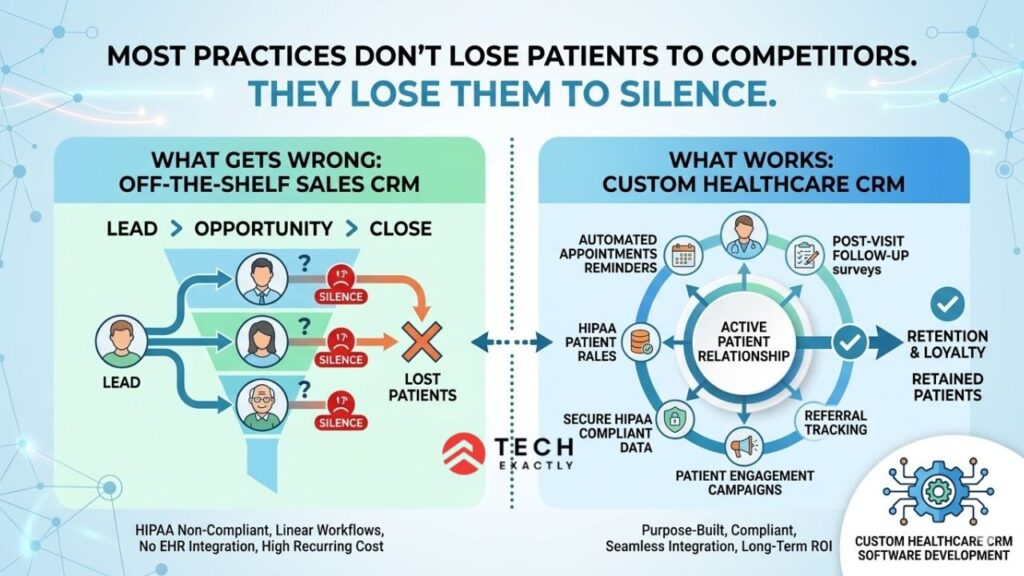
Key Takeaways
- Linking any patient data to clinical context — even something as simple as a prescription refill call — instantly makes it PHI, which means off-the-shelf CRMs like HubSpot aren’t BAA-ready by default.
- A healthcare CRM isn’t an EHR replacement — it handles the relationship layer between clinical encounters: appointment reminders, post-visit follow-ups, referrals, and overdue screenings.
- Customizing Salesforce or HubSpot for healthcare often costs more than building a purpose-built system — the constraints that make generic CRMs feel “almost right” are the same ones that make them expensive to fix.
- Practices that invest in a purpose-built CRM stop losing patients to inaction and start managing relationships with the same rigor they apply to clinical care.
Most Practices Don’t Lose Patients to Competitors. They Lose Them to Silence.
A patient visits your clinic. The visit goes well. They leave with a follow-up recommendation. And then — nothing. The patient neither gets a reminder nor a regular check-in. There’s not even a birthday wish mailer when the patient is already thinking about switching clinics.
That’s how most practices lose a patient, although the appointment went well. This happened because there was no follow-up. From a bird’s eye view, you can see this multiplying across hundreds of patients visiting your clinic. This financial damage in the numbers is often overlooked by the practice managers: rising no-show rates, flat patient acquisition, and a referral pipeline that should be working but isn’t.
Studies show CRM-based automated reminders help reduce zero turnups, with CRM-based engagement programs helping patient retention.
The problem isn’t awareness. Most practice owners know they need better patient relationship management. The problem is that the off-the-shelf CRM solutions built for sales teams don’t work for healthcare. Adding to that, healthcare-specific ones are either too expensive, too rigid, or not HIPAA-compliant in the ways that actually matter.
That’s where custom healthcare CRM software development comes in. And at Tech Exactly — a healthcare app development company — we’ve built enough of these systems to know exactly where the build goes right and where it falls apart.
What a Healthcare CRM Actually Is (and Isn’t)
Let’s clear the terminology first, as it may be confusing.
A healthcare CRM is not an EHR. It’s not even a patient portal or a billing system. EHR mostly handles the clinical data, medical records, and revenue management. Whereas a healthcare CRM handles the relationship layer, which is everything that happens between clinical encounters.
Think of it this way:
| System | What It Manages | Core User |
| EHR/EMR | Clinical records, diagnoses, prescriptions, and lab results | Physicians, nurses |
| Patient Portal | Patient access to their own health data, messaging | Patients |
| Billing/RCM | Claims, payments, and insurance verification | Billing staff |
| Healthcare CRM | Patient communications, follow-ups, referrals, acquisition, retention campaigns | Practice managers, marketing, and front desk |
The above insights make it clear that a healthcare CRM runs alongside other systems. It pulls data from the EHR to understand patient history. Then, it uses this data to drive engagement through appointment reminders, post-visit follow-ups, surveys, referrals, overdue screenings, etc.
It is important to understand this difference because whenever a CRM vendor approaches you, they will mention how Salesforce or HubSpot can work for healthcare. However, without significant customization, it’s practically impossible to achieve this. Customization is quite expensive, and it often costs more than building something purpose-built.

Why Off-the-Shelf CRMs Break Down in Healthcare
To invest in custom healthcare CRM software, it’s important to first understand why the off-the-shelf developments fail for most of the clinics. It’s not the case that the available products like Salesforce and HubSpot are bad products. It’s because healthcare has limitations that a generic CRM software cannot handle, as it is not designed for those constraints.
HIPAA changes everything. A generic CRM has contact information, engagement data, and communication history. As soon as this data is linked to a patient’s clinical context, this data becomes Protected Health Information.
For example, “John Smith called about his prescription refill ” is PHI. This means that any field associated with patient data, email templates, or automations must comply with the HIPAA Security Rule. Most off-the-shelf CRMs do not offer BAA-ready architecture by default. While Salesforce Health Cloud includes this environment, HubSpot’s core product doesn’t.
Healthcare workflows aren’t sales funnels. Generic CRMs have a linear pipeline, which is lead > opportunity > close. However, patient relationships aren’t always linear.
Let’s say a patient is active for 3 months, inactive for the rest of the year, and then receives a referral from another provider. They might see 4 different specialists under a single practice. Or perhaps they need a different communication flow based on the severity of the condition. If you try mapping all these criteria into a Salesforce pipeline without any custom objects, you will understand why implementations take time.
Integration requirements are non-negotiable. If a healthcare CRM is unable to pull appointment data from your EHR, insurance status from your billing system, or provider availability from your scheduling platform, it is just a standalone contact database. And nobody needs another standalone contact database.
Cost compounds fast. Salesforce Health Cloud costs $300 per user per month. Consider an example of a 15-person practice, which includes front desk staff, care coordinators, and a marketing lead; it amounts to about $54,000 per year. This cost is for licensing only, excluding implementation, customisation, or training.
A mid-sized customisation CRM architecture pays for itself within 2-3 years and does not carry recurring per-user fees. It’s this flexibility that makes custom software development worth investing in.

Core Features: What a Healthcare CRM Needs to Actually Work
Not every practice needs every feature on day one. Here’s how we scope healthcare CRM software development projects at Tech Exactly. We split them between what your MVP should include and what can be integrated in Phase 2.
MVP Features (Launch With These)
Feature | What It Does | Why It Matters |
Patient database with segmentation | Centralized patient records with filters by demographics, condition, visit recency, and insurance | Lets you run targeted outreach instead of blast communications |
Automated appointment reminders | SMS, email, or push reminders before appointments with confirmation/cancel options | Directly reduces no-show rates. This single feature justifies the CRM for most practices |
Post-visit follow-up automation | Triggered messages after appointments, such as satisfaction surveys, care instructions, follow up scheduling prompts. | Closes the communication gap that loses patients |
Referral tracking | Logs inbound and outbound referrals, tracks conversion from referral to booked appointment | Makes referral revenue visible instead of invisible |
Basic reporting dashboard | No-show rates, patient retention, campaign engagement, referral conversion | You can’t improve what you don’t measure |
EHR integration (read-only) | Pulls patient demographics, appointment history, and visit data from your existing EHR | Eliminates double data entry. Non-negotiable for adoption |
Phase 2 Features (Add After Validation)
Feature | What It Does | When to Add |
Marketing automation | Multi-step email/SMS campaigns for seasonal screenings, wellness programs, and new service announcements | Once you have baseline engagement data from MVP |
Patient satisfaction scoring | NPS or custom scoring with trend tracking per provider and location | Once you have 3+ months of survey data flowing |
Two-way EHR integration | Writes CRM actions (appointment requests, communication logs) back to the EHR | Once your EHR vendor’s API access is in place |
Insurance verification automation | Auto-checks eligibility before outreach campaigns to avoid wasted communication | When your patient volume justifies the integration cost |
Multi-location management | Separate dashboards, campaigns, and reporting per practice location with rollup views | When you open your second or third location |
AI-powered recall predictions | Identifies patients most likely to miss follow-ups or churn based on historical patterns | When you have 12+ months of engagement data to train on |
💡 Expert Tip: The single feature that pays for itself fastest is the automated appointment reminders. Even if your CRM does not do anything else, automated reminders alone will reduce no-shows, which will be enough to cover the development cost. That’s where you start. You can measure the impact and then build on everything else.
Let's Start Your Project Today
Ready to build your custom Healthcare CRM with us? Reach out now – our experts are just one click away.
HIPAA Compliance for Healthcare CRM: What You Can’t Skip
This is what makes healthcare CRM software different from the CRM systems used in other industries. If your CRM stores, shares, or processes any data related to a patient’s health status, treatment, or payment for care, you’re handling PHI.
What that means in practice:
Encryption is non-negotiable. AES-256 for data at rest. TLS 1.2+ for data in transit. Note that every database that contains PHI should be encrypted and not just the sensitive items. This is because in healthcare, anything that is related to a patient’s health status itself is PHI.
Audit logging is mandatory. The system must keep a record of all patient data accessed, i.e., who viewed it, when, and where it was accessed, and what was done. More importantly, the logs should be available for the next 6 years, and they should be tamper-proof. The 2025 HIPAA Security Rule updates make this even more important.
Access controls must follow least privilege. Front desk staff don’t need access to clinical notes, and the marketing team doesn’t need to see insurance information. A role-based access control (RBAC) isn’t a nice-to-have feature, but a regulatory requirement.
Every vendor needs a BAA. Whenever PHI is handled by third-party service, such as cloud hosting, SMS gateways, delivery tools, or analytics platforms, you must sign a Business Associate Agreement before going live.
Penetration testing is now mandatory. Under the 2025 HIPAA Security Rule updates, penetration testing must be done at least once every 12 months, and vulnerability scans every 6 months. Make sure to include this in your annual budget.
It might sound like a lot, but it’s actually quite standard. Experienced healthcare CRM development teams handle these architectural decisions during the scoping phase, not later during testing. We’ve covered the full checklist in our HIPAA compliance guide.
The Integration Layer: What Your Healthcare CRM Must Connect To
A CRM that works in isolation is nothing but a fancy Excel sheet. Below, you can find out what exactly a production healthcare CRM needs to integrate and what each integration involves.
Integration | What It Does | Complexity | Estimated Cost |
EHR/EMR (read-only via FHIR) | Pulls patient demographics, appointment history, visit data | Moderate | $20,000 – $35,000 |
EHR/EMR (two-way via FHIR + HL7v2) | EnablesReads and writes, ensuring the CRM actions are logged in the clinical record | High | $40,000 – $65,000 |
Practice management / scheduling | Syncs appointment slots, provider availability, and booking confirmations | Moderate | $10,000 – $20,000 |
Billing / RCM system | Pulls insurance eligibility and payment status for outreach segmentation | Moderate | $15,000 – $25,000 |
Email delivery (SendGrid, Mailgun) | Transactional and marketing email with BAA | Low | $3,000 – $5,000 |
SMS gateway (Twilio with BAA) | Appointment reminders, two-way patient texting | Low | $3,000 – $8,000 |
The EHR integration is where timelines get unpredictable. Epic, Oracle Health (Cerner), and Athenahealth all have different FHIR implementations. Getting sandbox access takes weeks. Production credentials take longer.
If your practice runs a legacy system that still uses HL7v2 for certain data types, you’ll need to support both protocols.
How Much Does Healthcare CRM Software Development Cost?
A customised healthcare CRM development costs less than most practice owners expect, especially when we compare against multi-year licensing fees for other enterprise platforms.
Scope | Cost Range | Timeline | What You Get |
MVP | $40,000 – $80,000 | 3–4 months | Patient database, automated reminders, referral tracking, basic reporting, read-only EHR integration |
Mid-range | $80,000 – $150,000 | 5–7 months | Everything in MVP + marketing automation, satisfaction scoring, two-way EHR, multi-location support |
Enterprise | $150,000 – $250,000+ | 7–10 months | Full-featured platform with AI predictions, custom analytics, complex multi-system integrations |
Compare that to licensing costs:
Platform | Per User/Month | Annual Cost (15 Users) | 3-Year Total |
Salesforce Health Cloud | ~$300 | $54,000 | $162,000 |
Veeva CRM | ~$250 | $45,000 | $135,000 |
Custom-built CRM | — | Hosting + maintenance only (~$15,000–$25,000/yr) | $45,000–$75,000 after initial build |
A customized MVP costs around $60,000 with an additional 3 years of maintenance costing $20,000/year, totalling $120,000. On the contrary, 3 years of Salesforce Health Cloud licensing alone costs $162,000. This is without considering the $50,000 required for implementation and customisation that the Health Cloud requires for healthcare workflows.
The math changes as you grow. A solo clinic with three users can usually manage with an off-the-shelf system. But once you have more than 10 users in different roles, a custom system often makes more financial sense. Plus, the software fits your workflow; instead of your team having to adapt to the software.
For a more detailed breakdown of what goes into building a compliant product, check out our 2026 healthcare app development guide.

Tech Stack: What We Recommend for Healthcare CRM Development
The tech stack for a healthcare CRM isn’t extraordinary. What really matters is choosing HIPAA-eligible options at every layer and not complicating the architecture. This is because the entire system is only about data management and workflow automation.
Layer | Our Recommendation | Why |
Frontend | React or Next.js | Component-based, large talent pool, fast development |
Backend | Node.js or Python (Django/Flask) | Both support HIPAA-eligible deployments. Python, if you plan to add ML/AI later |
Database | PostgreSQL on AWS RDS (with encryption) | Battle-tested, HIPAA eligible under AWS BAA, supports field-level encryption |
Cloud | AWS with signed BAA | Broadest set of HIPAA-eligible services. Most healthcare organizations are already here |
SendGrid (with BAA) | Reliable transactional + marketing email with BAA support | |
SMS | Twilio (with BAA) | HIPAA eligible messaging. Supports two-way SMS for patient replies |
Auth | OAuth 2.0 + MFA | Standard for clinical applications. MFA is mandatory under HIPAA |
💡 Expert Tip: Do not overbuild the tech stack. It’s important to understand that Healthcare CRM is not a real-time clinical system. At launch, there’s no need of an event-driven microservices or Kubernetes orchestration.
A well-defined architecture with specific API boundaries will serve a growing practice for years. You can always split into services later when you have a significant reason and not just because an architect told you to.
Healthcare CRM Development Timeline: What to Expect From Kickoff to Go-Live
Phase | Duration | What Happens |
Discovery + compliance scoping | 2–3 weeks | Map all data flows, define HIPAA boundaries, document BAA requirements, and finalize feature scope |
UX/UI design | 3–4 weeks | Workflow mapping with practice staff, role-based dashboard design, and mobile-responsive layouts |
Core development | 8–12 weeks | Patient database, automation engine, notification integrations, reporting |
EHR + third-party integration | 3–6 weeks | FHIR/HL7v2 integration, scheduling sync, and billing system connection |
Testing + compliance validation | 2–4 weeks | Pen testing, HIPAA compliance review, clinical workflow validation with real users |
Deployment + training | 1–2 weeks | Production deployment, staff onboarding, documentation handoff |
Total: 4–7 months, depending on integration complexity.
The discovery phase is the one that practice owners want to skip the most. But it’s the phase that saves the most money in the long term. A proper 2 weeks of scoping can help prevent $30,000 getting added to a project in the final month due to some “we didn’t think about that” conversations.
Let's Start Your Project Today
Ready to build your custom Healthcare CRM with us? Reach out now – our experts are just one click away.
How to Choose a Healthcare CRM Development Company
If you’re evaluating healthcare CRM software development services, here’s what to actually ask before you sign anything:
1. Have you built a healthcare CRM before?
Not “have you built a CRM,” and not “have you built healthcare apps.” Both. The intersection matters because healthcare CRM involves workflow patterns (recall campaigns, referral loops, provider-specific communication rules) that neither generic CRM experience nor generic healthcare experience prepares you for.
2. How do you handle HIPAA in the CRM context?
CRMs handle PHI quite differently than clinical systems. It can store a patient’s name, appointment history, phone number, etc. All of this data becomes PHI in the healthcare context. Your partner should understand these terms and where exactly the CRM database requires encryption, audit logging, and access controls.
3. What EHR systems have you integrated with?
This is where vague answers should disqualify a vendor. “We work with any EHR” means “we haven’t done this.” Ask specifically: Epic? Oracle Health? Athenahealth? Which FHIR version? Did you also need HL7v2 fallback?
4. Can you show me a compliance artifact from a past project?
A software development plan, a risk register, an audit log sample, anything that proves they’ve done compliant work, not just claimed it.
5. What does post-launch support look like?
What does post-launch support look like? A CRM isn’t something that you build and then forget about it. As the patient engagement workflows, EHR APIs, and compliance changes, so does the CRM. You need a partner who takes care of all these updates and changes.
Build a Healthcare CRM That Your Practice Will Actually Use
The difference between a healthcare CRM software built for patient retention and one that is quite generic all depends on whether it was built around your workflow or if the staff was forced to change how they work.
At Tech Exactly, we build healthcare CRM software that supports not only practice managers but also the day-to-day work of front desk staff and care coordinators. Every integration, automation, and compliance feature is designed around your needs, not ours.
In case you are at a stage where you are struggling with patient follow-ups and are fully aware that a simple Excel tool won’t help, we are here to help you.
Let's Start Your Project Today
Ready to build your custom Healthcare CRM with us? Reach out now – our experts are just one click away.
FAQ on Healthcare CRM Software Development
An EHR normally manages clinical data such as lab results, diagnoses, medications, and treatment notes. On the other hand, a healthcare CRM manages the intermediate layer of relationship management. This includes follow-ups, patient communications, referral tracking, recall campaigns, and marketing automation. These systems complement each other. In simpler terms, CRM uses data from EHR to personalize outreach but doesn't entirely replace it.
Yes. The moment patient data, such as name and appointment date are linked, you are handling PHI. This means AES-256 encryption, audit logging, role-based access controls, and BAAs with every vendor in the stack come into the picture.
Yes, that’s an option—and it works well for some organizations. But Salesforce Health Cloud usually costs $300+ per user per month, and you’ll still need significant customization to match healthcare workflows. The initial implementation can alone cost $50,000–$100,000 or more.
If your clinic has more than 10 users, building custom software can actually be cheaper over three years or more. It also gives you a system that fits your workflow instead of forcing your team to adapt to someone else’s software.
An MVP takes about 3-4 months, which includes patient database, referral tracking, and a read-only EHR. If you are looking for a fully defined system along with marketing automation, two-way EHR integration, and a multi-location system, it takes about 5-7 months. Note that the timeline depends significantly on EHR integration complexity.
Automated appointment reminders. Based on research, CRM-based appointment reminders help reduce patient no-shows significantly. This single feature, which costs $5,000-$8,000 to build, will generate ROI within the first month of usage. Everything else will come afterwards.
Certainly yes, provided your EHR exposes FHIR or HL7v2 APIs. Systems like Epic, Oracle Health (Cerner), eClinicalWorks, Meditech, and Athenahealth all support this integration. However, the timeline and cost heavily depend on which system you run and whether you require read-only or two-way exchange.

Manas Das, Mobile App Architect at Tech Exactly, has over 9 years of experience leading teams in iOS, Android, and cross-platform development. He specialises in scalable app architecture and GenAI-driven mobile innovation.