


How to Integrate AI into Your App: Full Guide

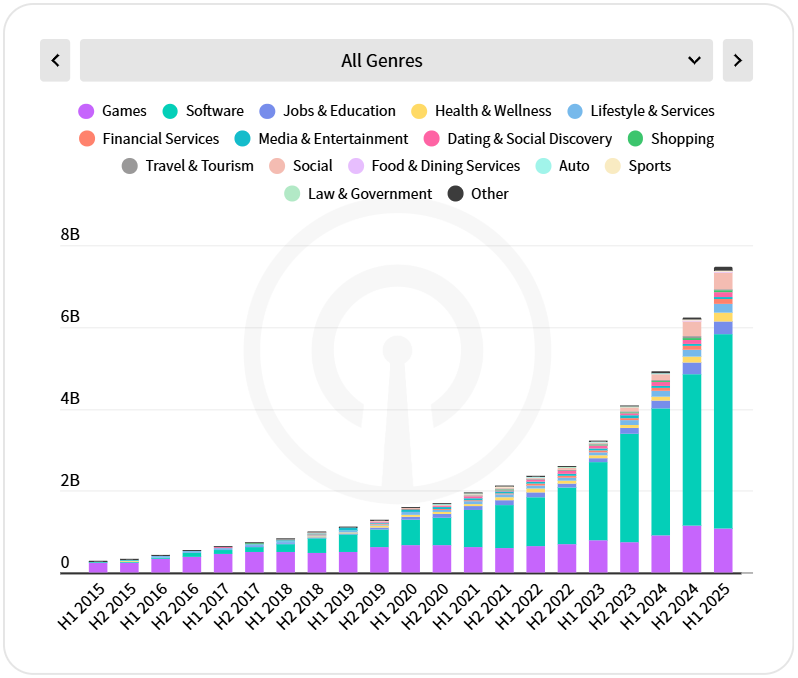
AI is no longer experimental. In the first half of 2025, generative AI apps were downloaded 1.7 billion times worldwide, a 70% jump from the previous six months, with in-app revenue doubling. From fitness apps that coach your movements to banking apps that predict expenses, AI quietly powers everyday digital moments.
But is integrating AI into an app just about “adding a chatbot”? Definitely not. It involves weaving intelligence into the user experience so it feels effortless and natural.
According to Sensor Tower, apps that included terms like “AI” or “LLM” in their names or descriptions saw a clear increase in downloads.
If you are looking for “how to integrate AI into an app,” this guide is for you.
In this guide, we will walk you through how to integrate AI into your app step by step, with examples, data, and some insights straight from our Tech Exactly team, who have helped clients turn simple ideas into intelligent products.
Why Businesses Should Adopt AI in Software Application Development
After handling over 1000+ client calls this year, our team at Tech Exactly has understood that artificial Intelligence has moved beyond hype and is now a practical tool for enhancing apps and driving business growth. Integrating AI into your app is far more than just a tech upgrade. A way to understand users better, automate tasks, and make smarter decisions. It is giving your app a brain that learns, adapts, and improves over time.
Here’s why businesses are embracing AI in their software applications.
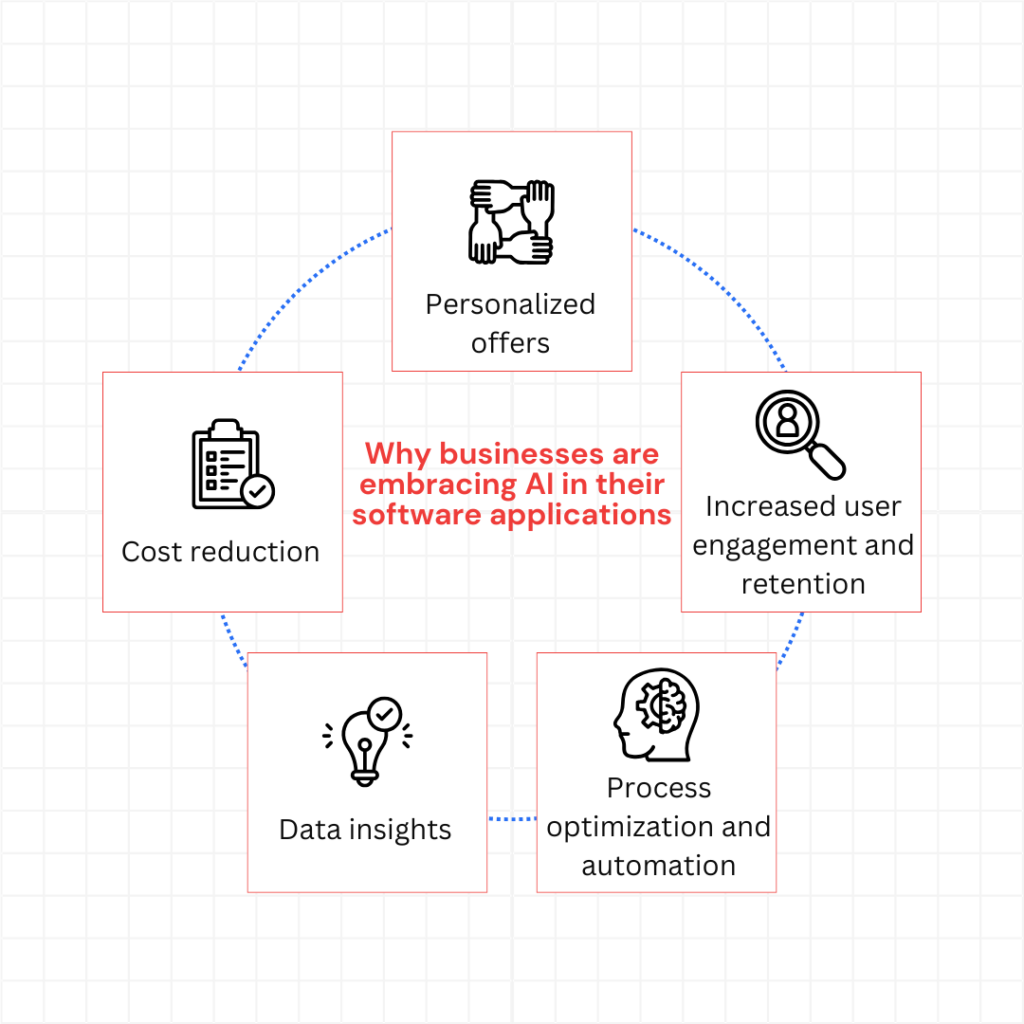
Personalized offers
Users expect apps to “know” them. AI can analyze behavior, purchase history, and preferences to suggest content, products, or services that feel tailor-made.
Spotify’s “Discover Weekly”, which uses collaborative filtering to recommend songs based on listening habits, is an AI-driven feature that has contributed to a 44% increase in user retention.
So, how does it actually work? The process usually involves three key steps:
- Data Collection: The app collects user interactions, purchase history, browsing patterns, and preferences. This creates a rich dataset for AI to learn from.
- Pattern Recognition: Generative AI models analyze the data to identify trends and patterns, such as what types of products a user tends to explore or purchase.
- Dynamic Recommendation: The AI generates tailored suggestions in real-time, adapting as the user interacts with the app. Over time, the model learns and refines its predictions for more accurate personalization.
As our mobile app architect explained:
“With generative AI, personalization is not just reactive. It generates content and recommendations that anticipate user needs, so each suggestion feels relevant before the user even searches for it.”
Increased user engagement and retention
When you integrate AI into an app, you create experiences that keep users coming back. Machine learning algorithms analyze user behaviour patterns to identify drop-off points and engagement triggers.
For example, Starbucks DeepBrew AI powers their app’s personalized ordering experience, recommending drinks based on time of day, weather, and past orders, leading to growth in their customer base to nearly 18 million by the end of 2019.
🗒️Note: AI-powered features like predictive search, smart notifications, and adaptive interfaces reduce friction in the user journey.

Even push notifications powered by AI demonstrate this principle perfectly. This targeted approach can boost notification click-through rates by up to 400% while reducing uninstall rates caused by notification fatigue.
Process optimization and automation
You will agree that AI transforms repetitive workflows into autonomous systems. From document scanning to support queries, it allows teams to scale efficiently.
AI works like a relay runner in a well-coordinated team, instantly taking over routine tasks as humans pass them on, keeping workflows moving without pause or fatigue.
But how does it do that? By combining pattern recognition, natural language processing, and predictive algorithms, AI systems learn from past data to anticipate actions and execute them automatically. Whether it is reading documents, classifying information, or responding to queries, AI continuously refines its accuracy through feedback loops, meaning the more it works, the smarter it becomes.
For instance, AI-powered chatbots handle up to 70% of routine customer queries for major e-commerce brands, cutting human intervention dramatically.
AI is equally powerful in back-end automation. It processes invoices, extracts data, and verifies entries with 95%+ accuracy, eliminating hours of manual work. In industries like healthcare and logistics, such automation means faster turnaround times and fewer human errors.
Data insights
AI changes raw data into actionable insights. By integrating AI into your app, you can uncover patterns that traditional analytics might miss.
A travel booking platform, for example, can predict which destinations will trend next season based on search and booking data. Similarly, fintech apps can forecast spending behaviour and credit risks through continuous model training.
At Tech Exactly, our EarthSnap app, developed for a US-based biodiversity company, uses AI-powered image recognition to identify over 2 million plant and animal species. The app learns from every image upload, improving accuracy over time and providing users with detailed, real-time insights.
This demonstrates how AI can turn data into a learning ecosystem, where every user interaction strengthens the product.
Cost reduction
While AI integration requires upfront investment, the long-term savings are significant. Automated workflows, predictive maintenance, and reduced manual errors all contribute to cost efficiency.
For example, in manufacturing, AI-powered predictive maintenance analyses sensor data from machinery to detect early signs of wear or malfunction. Instead of waiting for a breakdown, the system schedules maintenance only when necessary. Preventing costly downtime and extending equipment life. The same principle applies to digital systems, where predictive algorithms monitor cloud usage patterns to allocate resources dynamically, ensuring you pay only for what delivers value.
A McKinsey study found that companies integrating AI into core processes reduce operational costs by up to 90%. In app development, predictive algorithms can also reduce cloud costs by optimising compute usage, ensuring you pay only for resources that deliver value.
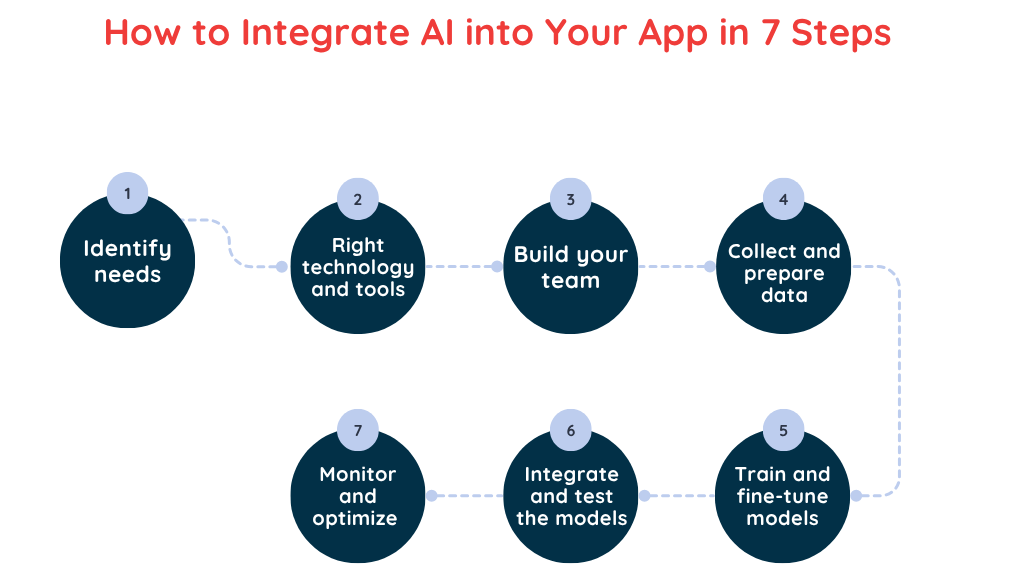
How to Integrate AI into Your App in 7 Steps
Integrating AI into an app requires a structured approach. Each step combines technology, business insight, and software processes to ensure that your AI model delivers value to users while remaining scalable and maintainable.
Identify needs
Before you start, define why your app needs AI. Identify areas where AI can enhance the user experience, automate processes, or provide actionable insights.
Ask:
- Which business challenges can AI solve?
- Where can AI improve engagement or retention?
- How will AI enhance software processes or operational efficiency?
A clear understanding of use cases ensures you choose the right machine learning models and tools later. This is where we usually start discussions with clients looking to integrate ML model into your app.
Of course, there are situations where building your own model becomes essential, such as when handling sensitive data (like patient records in healthcare) or tackling unique challenges that off-the-shelf models cannot address.
Choose the right technology and tools
Once you define your problem and approach, selecting the right AI technology is crucial. It determines your app’s capabilities, scalability, and the expertise or infrastructure required to support it.
Machine learning and predictive analytics
ML trains algorithms to analyse data, detect patterns, and improve with experience. It powers:
- Real-time data analysis and trend detection.
- Personalised recommendations.
- Forecasting customer behaviour and market shifts.
Natural language processing (NLP)
NLP enables machines to understand and interpret human language, including context, intent, and sentiment. Common use cases include:
- Text classification and information extraction.
- Machine translation.
- AI-powered assistants and chatbots like GPT models.
Image and voice recognition
These technologies allow machines to see and hear. Image recognition identifies objects in visuals (as used in security, healthcare, and e-commerce), while voice recognition processes speech for assistants, transcription tools, and voice controls. Together, they make digital interactions more natural and intuitive.
Generative AI
Generative AI creates new content: text, images, or audio, by learning from existing data.
- GANs generate visual content.
- Transformer models (like GPT) create text and conversations.
Speaking of Gen-AI, we have an article dedicated to 7 types of generative AI models, feel free to check it out, too.
For startups, it’s often faster to collaborate with a generative AI development company or hire AI developers who know how to use AI in mobile app.
⏭️ Our advice: If you are a startup, begin with a pre-trained model such as OpenAI or Google Cloud AI. It helps validate user impact quickly before investing in full custom model training. Once there’s data and traction, fine-tuning becomes easier.
Build your team
Successful AI integration needs a cross-functional team. Each member ensures that the AI system meets both technical and business objectives. Proper collaboration creates a seamless bridge between machine learning insights and practical app features.
- AI engineers to design and train models.
- Mobile app developers to implement AI features.
- Business analysts to align AI capabilities with company goals.
If your goal is to enhance user experience through AI-driven recommendations, you will need data scientists and UI/UX designers. But if you are optimizing backend operations, data engineers and machine learning engineers will play a bigger role.
Collect and prepare data
Data is the backbone of AI. The first question most teams ask is: how much data is enough? Ofcourse, as much as possible. But it depends on your goals, use case complexity, and chosen technology. Not all collected data will be useful, hence always collect relevant application data from users, logs, transactions, and interactions.
Then, clean, label, and structure it for training. Proper preparation ensures your AI in apps performs accurately.
For example, Google’s Open Images offers labelled image datasets, while GitHub hosts repositories for speech and text recognition projects.
In EarthSnap, millions of images were preprocessed and annotated to allow the AI to recognize plant and animal species with high precision. Well-prepared data is critical if you want to know how to incorporate AI into app successfully.
Train and fine-tune models
This is where machine learning and generative AI start learning patterns from your data.
- Supervised learning trains the model on labelled datasets.
- Unsupervised learning finds hidden patterns.
- Fine-tuning adjusts the model to improve accuracy and reduce bias.
At Tech Exactly, our approach involves iterative training and testing to make sure the AI model is robust and reliable in real-world scenarios. Fine-tuning ensures your system adapts to new user behaviour, which is crucial when you want to how to add AI to your app effectively.
A great example is Google’s use of BERT in its search algorithm, helping it understand the context and subtle meaning behind every query.
When building AI for chatbots, virtual assistants, or code tools, fine-tuning helps the model adapt precisely to the app’s goals and behaviour.
Integrate and test the models
Once trained, this is the step where the AI model is integrated into the mobile or web application.
- Use lightweight deployment frameworks for mobile.
- Ensure low latency and smooth performance.
- Conduct extensive integration testing to validate real-world functionality.
AI integration primarily involves setting up APIs that allow your app to communicate with the model. In simple terms, APIs enable different software systems to exchange data seamlessly. For instance, to integrate ChatGPT, you would sign up for OpenAI’s API access.
During integration, our team at Tech Exactly always simulates real-world usage: network drops, high load, and mixed-language queries to ensure the AI behaves consistently. Testing under stress conditions early helps avoid expensive surprises post-launch.
Regarding testing, here’s a quick question: Have you checked if your app can handle AI requests during peak usage? Testing ensures AI features enhance the user experience without slowing down the application.
At this stage, monitoring metrics like response accuracy, processing time, and engagement helps verify that the AI integration is not only functional but also adds real value to your app.
Monitor and optimize them
AI is not a one-time deployment. Continuous monitoring and process optimisation are required to keep the system effective.
- Track user interactions and model performance.
- Retrain models with new data to improve accuracy.
- Scale AI capabilities as app usage grows.
By leveraging analytics, feedback loops, and adaptive AI, your app can consistently deliver actionable insights and an improved experience. Proper monitoring ensures sustainable ROI and scalable AI in app development, so your AI system grows smarter as your business and user base expand.
In the 2022 report, Deloitte Digital published on personalization, 69% of consumers said they were more likely to buy when their customer experience was personalized.
Final Thought
When it comes to AI integration, you have two paths:
- Build your own model.
- Adopt an existing one.
Unless AI is your company’s core offering, most businesses benefit more from adopting and adapting existing models, as it is faster, cost-effective, and scalable.
But before making any decision, always ask yourself: What would it mean for your users if every interaction felt smart and effortless?
From global leaders like Spotify to Tech Exactly’s own EarthSnap, AI proves that even complex processes can feel seamless for the end user. AI integration is an ongoing journey, not a one-time project. The apps that thrive are those that monitor, optimise, and evolve, delivering smarter experiences, actionable insights, and measurable business value over time.
If you are ready to bring this level of intelligence to your app, it’s time to hire AI developers or collaborate with a generative AI development company.
If you have queries around how to use ai in an app, please write to us at [email protected]
