


Doctor Appointment App Development: Features, EHR Integration, and HIPAA Compliance

Key Takeaways
- EHR integration is the hardest part of the build, not the booking flow. Connecting to Epic, Cerner, or athenahealth through FHIR APIs is where most timelines slip — plan for it from day one.
- HIPAA applies to more than you think in an appointment app. Automated reminders, insurance verification, video consultations, and even push notifications all touch PHI in ways that trip up teams who treat compliance as a single checkbox.
- The provider portal matters as much as the patient app. Most guides only cover the patient side. Physicians need schedule management, no-show tracking, and clinical note access — skip this and adoption falls apart.
- White-label gets you to market faster, but locks you in. Readymade doctor appointment app solutions save 3–4 months upfront. The trade-off is limited customisation and zero control over your EHR integration layer.
- MVP to launch takes 3–5 months with a full team. Add EHR integration and you’re looking at 6–9 months. Add HIPAA audit and penetration testing and budget another 4–6 weeks on top.
Booking a doctor’s appointment still takes an average of eight minutes by phone. Rescheduling takes another eight. For a generation that orders food in 30 seconds, that gap is hard to justify. This is the reason why the medical scheduling software market is on track to cross $1.5 billion by 2033.
For clinics, hospitals, and healthtech startups, the opportunity is straightforward. Build a doctor appointment app that makes booking as easy as it should be, while handling the compliance and integration work. This makes healthcare software harder than everything else.
This guide walks through the full build with features, EHR integration, HIPAA compliance, tech stack, and what the development process actually looks like. If you’re evaluating whether to build custom or go with a readymade doctor appointment app development solution, this will help you understand what each path involves.
Doctor appointment apps are one of several categories within healthcare application development alongside patient portals, telemedicine platforms, and remote monitoring systems. The compliance and integration patterns overlap, but scheduling apps have their own specific requirements.
Types of Doctor Appointment Apps: Clinic-Specific, Marketplace, and On-Demand
All appointment apps do not work the same way. The type you build determines your feature set, your revenue model, and how complex the EHR integration gets.
Clinic-specific apps are built for a single hospital, clinic network, or practice group. The app connects directly to that organisation’s scheduling system and EHR. Patients see only the providers within that network. This is the most common model for health systems building their own digital front door.
Marketplace apps follow the Zocdoc model. Patients search across multiple providers, filter by specialty, insurance, location, and availability, then book directly. The app is a bridge between the patient and multiple independent practices. Revenue comes from provider subscriptions or per-booking fees. The integration work is tough because you’re connecting to multiple EHR systems, not one.
On-demand apps focus on same-day or next-available appointments, often paired with telemedicine app development features like video consultations—for example, Doctor on demand and HealthTap. The scheduling logic is different. It’s less about calendar booking and more about real-time provider availability and queue management.
Most custom builds start as clinic-specific apps. The marketplace and on-demand models require significantly more infrastructure and provider onboarding before they generate value.
Let's Start Your Project Today
Ready to build your Doctor Appointment App with us? Reach out now – our experts are just one click away.
Doctor Appointment App Features: What Patients, Providers, and Admins Actually Need
Most guides stop at listing patient-facing features. But in reality, a doctor appointment booking app serves three distinct user groups, and the experience has to work well for all of them.
Patient app
- Doctor search with filters: specialty, location, insurance accepted, language, ratings
- Real-time calendar view showing available slots, and not a request form that someone responds to in 24 hours
- Appointment booking, rescheduling, and cancellation
- Automated reminders (SMS, push, email) with HIPAA-compliant content rules (more on this below)
- Secure video consultation for telehealth appointments
- Prescription history and refill requests
- In-app payments with insurance co-pay calculation
- Document upload (insurance cards, referral letters, prior records)
- Integration with Apple HealthKit and Google Fit for pre-visit health data sharing
Provider portal
This is the side most competitors ignore, and it’s the side that determines whether physicians actually use the app or go back to their old system.
- Daily and weekly schedule view with drag-and-drop rescheduling
- Patient queue with check-in status
- No-show tracking and waitlist management
- Pre-appointment review: patient history, uploaded documents, reason for visit
- Clinical notes entry linked to the appointment record
- Automated follow-up scheduling based on visit type
- Integration with the practice’s existing EHR, and not a parallel system that creates double documentation
The patient portal development side of this overlaps significantly. If you’re building both, design the data layer once.
Admin layer
- Provider onboarding and credential management
- Appointment analytics: volume, no-show rates, peak hours, average wait times
- Revenue reporting and billing reconciliation
- Role-based access control and audit logging
- Insurance panel management
How to Integrate EHR Systems Into a Doctor Appointment Booking App
This is the section that matters most and the one every other guide skips or squeezes into a single paragraph.
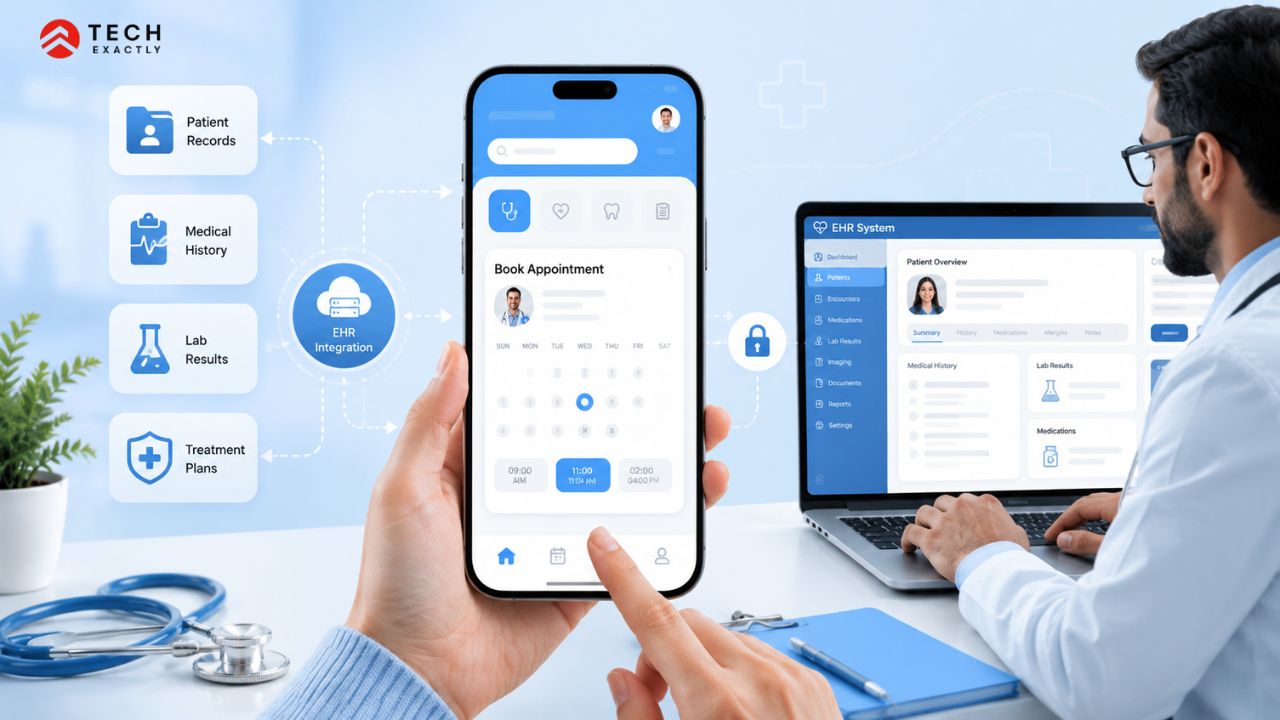
A doctor appointment app that doesn’t connect to the clinic’s EHR is just a standalone scheduling tool. It might work for independent practices, but any hospital, health system, or multi-provider clinic will require EHR integration before they adopt it. Without it, staff enter appointment data twice, once in your app and once in their EHR, and that kills adoption within weeks.
What the integration actually involves:
FHIR R4 is the standard. HL7 FHIR (Fast Healthcare Interoperability Resources) is the API framework that Epic, Cerner (now Oracle Health), athenahealth, and most modern EHRs expose for third-party scheduling. You’ll be working with the Appointment, Schedule, Slot, and Patient FHIR resources. If your backend team hasn’t built against FHIR before, this is where the learning curve hits.
Sandbox access is gated. Epic’s App Orchard (now the Epic on FHIR developer portal), Oracle Health’s Code Program, and athenahealth’s developer portal all require registration and approval before you get sandbox access. The covered entity (the hospital or clinic) sponsors your access; your development team doesn’t get credentials independently. Build this lead time into your project plan.
SMART on FHIR for authentication. If your app needs to pull patient data from the EHR (appointment history, demographics, insurance), you’ll implement SMART on FHIR, the OAuth 2.0-based authorization framework that EHRs use. This isn’t optional for production EHR access.
Bi-directional sync matters. Patients book in your app; the appointment shows up in the EHR. A provider reschedules in the EHR; the change reflects in your app. One-way sync creates conflicts within days. Design for bi-directional from the start instead of retrofitting it later as it is a significant rearchitecture.
The timeline impact is real. EHR integration adds around 2 to 4 months to the development timeline. This depends on which EHR you’re targeting and how responsive the health system’s IT team is. Epic integrations tend to take longer due to the review process. Plan for this as it’s the most common source of timeline slippage in doctor appointment app development.
Our EHR integration guide provides the full picture on budget and common failure points.
Let's Start Your Project Today
Ready to build your Doctor Appointment App with us? Reach out now – our experts are just one click away.
HIPAA Compliance Requirements for Doctor Appointment Apps
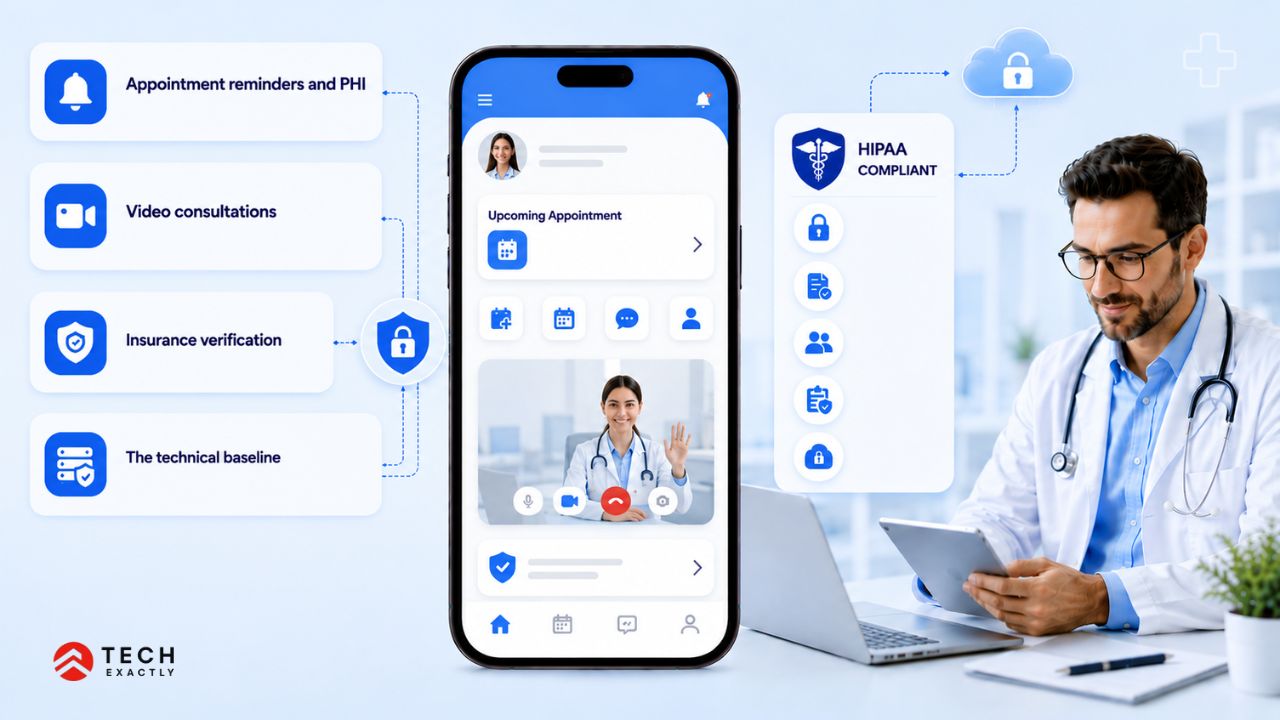
Any doctor appointment app that stores or manages patient information, which is practically every such app, needs to comply with HIPAA regulations. But the specific compliance requirements for scheduling apps are different from, say, a remote monitoring app or a clinical data platform. Here’s what actually applies:
Appointment reminders and PHI
Automated reminders are a core feature. They also touch PHI. HIPAA allows appointment reminders, but the content matters:
- An SMS saying “You have an appointment tomorrow at 2 pm” is generally acceptable
- An SMS saying “Your cardiology follow-up for atrial fibrillation is tomorrow at 2 pm with Dr. Shah” includes diagnostic information, which is PHI in a potentially unsecured channel
- Push notifications follow the same rules. The notification preview shown on a locked screen cannot include clinical details
The safe approach is to have the reminders confirm time, date, and location only. Clinical context stays inside the app, behind authentication.
Video consultations
If your app includes telemedicine features, the video infrastructure needs end-to-end encryption. Consumer tools like standard Zoom or FaceTime don’t meet HIPAA requirements. You need either a HIPAA-compliant video SDK (Twilio Video with BAA, Vonage, Doxy.me API) or Zoom for Healthcare with a signed BAA.
Insurance verification
Insurance eligibility checks pull patient data from payer systems. That data is PHI. The API connections to insurance verification services (Eligible, Change Healthcare, Availity) all need BAAs, and the data needs to be encrypted in transit and at rest.
The technical baseline
Regardless of the specific features, every doctor appointment app needs:
- AES-256 encryption at rest, TLS 1.2+ in transit
- Role-based access control with audit logging
- BAAs with every vendor that touches patient data, like cloud provider, SMS service, analytics tool, and crash reporting platform
- Annual HIPAA risk assessment
- Breach notification procedures
For a full walkthrough of the technical safeguards, our guide on HIPAA-compliant app development covers the implementation side in detail.
Tech Stack for Doctor Appointment App Development
| Layer | Options | Notes |
|---|---|---|
| Patient mobile app | React Native, Flutter | Cross-platform covers iOS and Android from one codebase |
| Provider dashboard | React, Angular | Web-first providers use desktops and tablets, not phones |
| Backend | Node.js, Python (Django/FastAPI) | Python if you plan to add ML features later (no-show prediction, scheduling optimisation) |
| Database | PostgreSQL, MongoDB | PostgreSQL for structured appointment and patient data; MongoDB if you need flexible document storage |
| Data layer | HAPI FHIR, Azure FHIR Service | Required for any EHR integration, don’t skip this |
| Video | Twilio Video, Vonage, Doxy.me API | Must have BAA for HIPAA compliance |
| Payments | Stripe (with BAA), Square Health | Insurance co-pay plus out-of-pocket payments |
| Notifications | Twilio (SMS), Firebase (push) | Firebase for in-app; Twilio for SMS reminders |
| Cloud | AWS (HIPAA BAA), Azure Healthcare APIs, GCP | Match to the target health system’s existing infrastructure |
| Maps/Location | Google Maps API | Provider search by proximity |
One thing worth noting is that the cloud provider decision often isn’t yours to make. If the hospital you’re integrating with runs on Azure, your FHIR service and data residency will likely need to be on Azure too. Choose your cloud provider after you know your first integration target, not before.
For teams evaluating whether to handle the mobile app development side in-house or bring in a specialist, the tech stack complexity is a useful benchmark. If your team hasn’t built FHIR integrations or HIPAA-compliant video infrastructure before, that’s where external expertise pays for itself.
How to Develop a Doctor Appointment Booking App: Step by Step
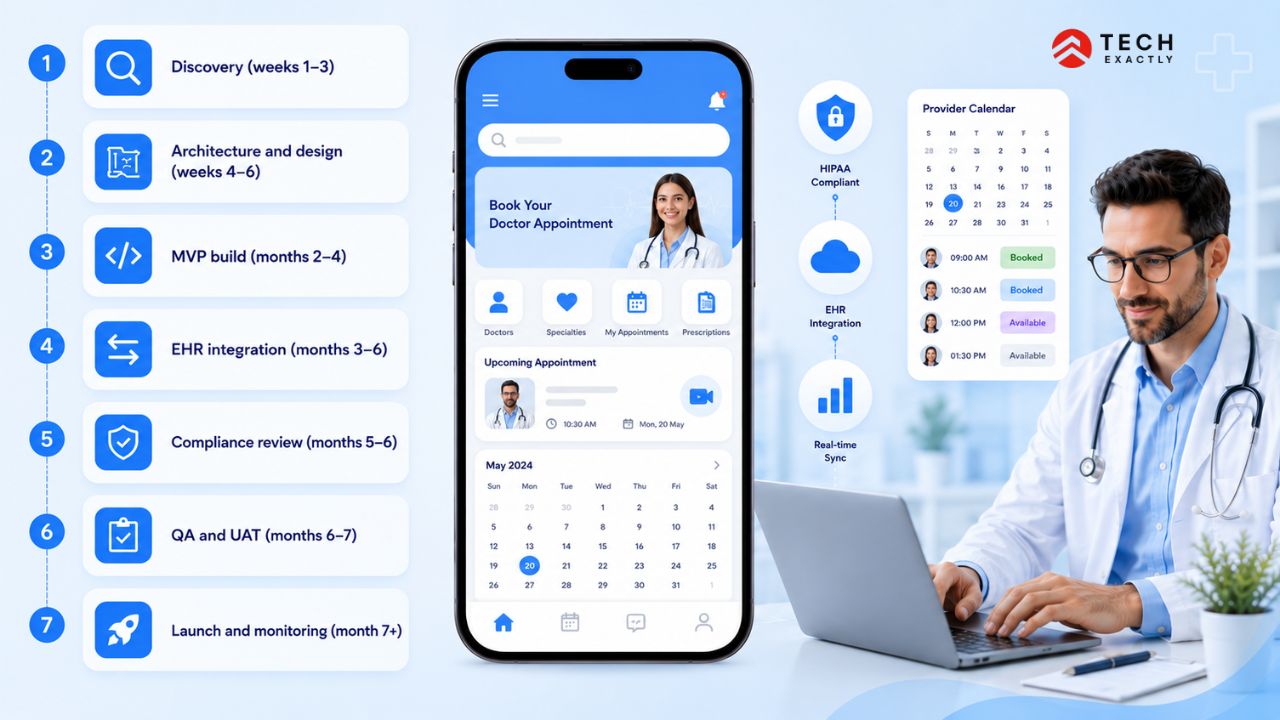
Discovery (weeks 1–3): Define the app type (clinic-specific, marketplace, on-demand), identify the target EHR for integration, and map out the feature set for MVP vs. full launch. Start by defining the app’s HIPAA scope. Features like video consultations, insurance verification, or prescription management each introduce additional compliance requirements.
Architecture and design (weeks 4–6): Data model, API contracts, FHIR resource mapping if EHR integration is in scope. UI/UX design for both patient and provider interfaces. Test the provider side with actual clinical staff early, and not just with your product team.
MVP build (months 2–4): Core booking flow, provider calendar, patient profiles, reminders, payments. HIPAA scaffolding, like encryption, access controls, and audit logging, should be from day one. Don’t plan to add compliance later, as it never works.
EHR integration (months 3–6, often parallel with MVP): Sandbox access, FHIR implementation, SMART on FHIR authentication, bi-directional sync testing. This phase runs alongside the core build but has its own timeline driven by the EHR vendor’s review process.
Compliance review (months 5–6): HIPAA risk assessment, penetration testing, BAA chain verification. If you’re working with a hospital system, their security team will have its own review process on top of yours.
QA and UAT (months 6–7): Functional testing, load testing on the scheduling engine (what happens when 200 patients try to book the same slot?), and clinical workflow testing with real providers. The provider UAT is where you find out whether the app actually fits into a physician’s day. Don’t skip it.
Launch and monitoring (month 7+): Staged rollout, starting with a single department or clinic before expanding. Monitor no-show rates, booking completion rates, and provider adoption. The first 30 days of data will tell you what needs fixing.
The decision on whether to build in-house or work with an external team is worth thinking through carefully. Our guide on in-house vs outsourcing software development covers the trade-offs like cost, IP ownership, HIPAA exposure in detail.
Let's Start Your Project Today
Ready to build your Doctor Appointment App with us? Reach out now – our experts are just one click away.
Team and Timeline for Doctor Appointment App Development
Core team:
- Product manager with healthcare domain knowledge
- 2 backend engineers (FHIR experience strongly preferred)
- 1–2 mobile engineers (React Native or Flutter)
- 1 frontend engineer for the provider dashboard
- 1 QA engineer
- 1 UI/UX designer
Specialist roles (project-dependent):
- HIPAA compliance consultant
- EHR integration specialist (if targeting Epic or Oracle Health)
Timelines:
- MVP without EHR integration: 3–5 months
- MVP with EHR integration: 6–9 months
- Add HIPAA audit and pen testing: +4–6 weeks
If you’re wondering how these timelines translate into actual costs across different features and healthcare app types, our healthcare app development cost breakdown explains it in a simple, practical way.
Start With the Integration, Not the Interface
Most teams start building the patient booking flow because it’s the most visible feature. That’s not the correct way. The EHR integration and HIPAA architecture are what determine whether the app gets adopted by a health system or remains unused.
Start with the hardest constraint. Decide which EHR you’re connecting to, what FHIR resources you need, and what your PHI boundary looks like. The booking flow, the UI, and the patient features are quite straightforward once the foundation is right.
If you’re planning a doctor appointment app and want to figure out the integration and compliance scope before committing to a build, Tech Exactly’s healthcare app development team works through these decisions with founders and CTOs before the first sprint.
Let's Start Your Project Today
Ready to build your Doctor Appointment App with us? Reach out now – our experts are just one click away.
FAQs About Doctor Appointment App Development
It depends on the scope. A basic clinic-specific app without EHR integration runs $50K–$120K. If you add EHR integration, video consultations, and insurance verification, the range is around $150K–$300K. Marketplace apps like Zocdoc that connect to multiple provider networks cost more, $300K+ for a production-ready platform. The variables that affect the most are EHR integration complexity and the number of provider systems you need to connect to.
Yes, without exception. Any app that handles patient names, appointment details, insurance information, or clinical data is processing PHI under HIPAA. Even a simple scheduling app that stores "Patient X has an appointment with Cardiologist Y on Date Z" contains PHI. There's no minimum threshold below which HIPAA doesn't apply.
Yes, through their FHIR R4 APIs. Epic exposes scheduling resources through the Epic on FHIR developer portal. Oracle Health (formerly Cerner) does the same through its Code Program. The integration requires the covered entity (the hospital or clinic) to sponsor your sandbox access, as your development team can't get credentials independently. Plan for 2–4 months of integration work, depending on the EHR and the responsiveness of the health system's IT team.
A marketplace app connects patients to multiple independent providers across different practices and health systems. The app owns the patient relationship and charges providers for bookings or subscriptions. On the other hand, a custom clinic-specific app is built for a single health system or practice group where patients see only providers within that network, and the app integrates directly with that organisation's EHR.. The custom model is simpler to build and gives you full control over the data layer and compliance architecture. Whereas the marketplace model has higher revenue potential but requires multi-EHR integration and provider onboarding at scale.
A functional MVP with booking, provider calendar, reminders, and payments takes 3–5 months without EHR integration. If you add EHR integration (Epic, Cerner, athenahealth) and the timeline extends to 6–9 months, driven largely by sandbox access and the EHR vendor's review process. HIPAA audit and penetration testing add another 4–6 weeks. Most teams underestimate the EHR integration timeline; it's the most common source of schedule delays.

Manas Das, Mobile App Architect at Tech Exactly, has over 9 years of experience leading teams in iOS, Android, and cross-platform development. He specialises in scalable app architecture and GenAI-driven mobile innovation.